
 E2E Cloud
GPU partitioning with MIG
MIG, Multi-Instance GPU, splits one physical GPU into several smaller, isolated GPU instances. Each instance has its own share of memory and compute, so more than one workload can use the same physical GPU at once.
Each instance is isolated in the hardware. When one instance is fully loaded, the others keep their own compute and memory, so their throughput and latency stay the same. MIG suits work that needs only part of a GPU, such as notebooks, inference services, and lightweight training jobs.
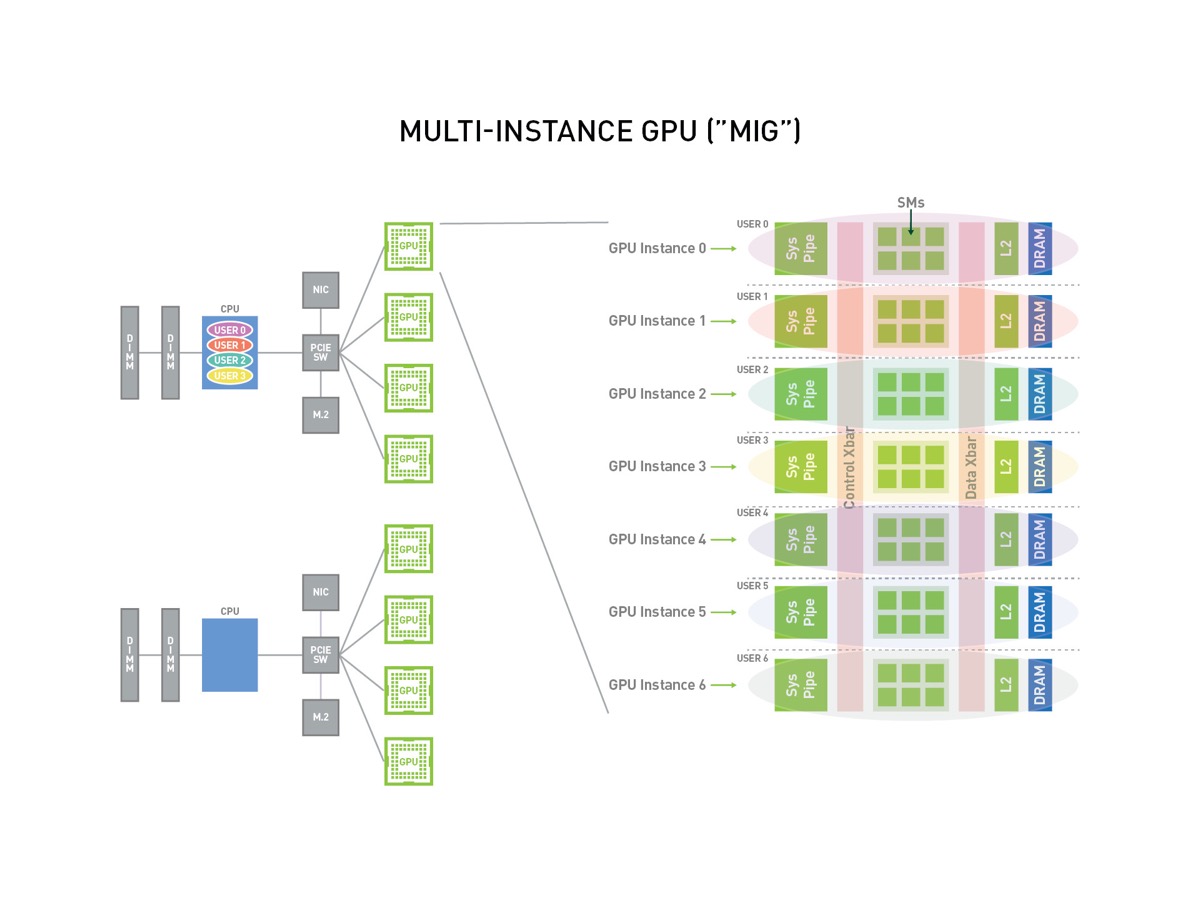
The diagram is NVIDIA’s illustration of MIG. The sizes and layouts you can use on E2E are under The layouts E2E offers.
MIG is available only on a private cluster; to run a workload on part of a GPU, launch it on a MIG-enabled cluster. MIG works on NVIDIA GPUs from the Ampere architecture onward.
MIG is a setting of the whole cluster
Section titled “MIG is a setting of the whole cluster”You turn MIG on or off when you create a cluster, and the setting covers every node in it. The private cluster list shows Mig: Enabled or Mig: Disabled for clusters where it applies.
Choose an instance size when you launch a service
Section titled “Choose an instance size when you launch a service”On a MIG-enabled cluster, you pick a GPU instance size from a plan list when you launch an instance or another service, such as MIG-1g.10gb or MIG-2g.20gb on an H100 cluster. The sizes on offer depend on the cluster’s GPU card. See Launch services on a private cluster.
Instance sizes
Section titled “Instance sizes”A size’s name gives its share of the GPU’s compute, in sevenths, then its memory. A 2g.20gb
instance has two sevenths of the compute and 20 GB of memory.
| Compute share | H100 size | H200 size |
|---|---|---|
| 1/7 | 1g.10gb |
1g.18gb |
| 1/7 | 1g.20gb |
1g.35gb |
| 2/7 | 2g.20gb |
2g.35gb |
| 3/7 | 3g.40gb |
3g.70gb |
| 4/7 | 4g.40gb |
4g.70gb |
| 7/7, the whole GPU | 7g.80gb |
7g.141gb |
A 3g and a 4g instance get the same amount of memory, because they share the same part of the
GPU’s memory.
The layouts E2E offers
Section titled “The layouts E2E offers”Instances share a GPU only in fixed layouts. E2E offers 16 layouts per GPU card,
each with up to seven instances on one GPU. Because 3g and 4g instances share memory, a layout
pairs a 4g with a 3g rather than offering two of either. Some of the layouts:
| GPU card | Layout | Instances on one GPU |
|---|---|---|
| H100 | One whole GPU, 7g.80gb |
1 |
| H100 | One 4g.40gb and one 3g.40gb |
2 |
| H100 | Two 2g.20gb and one 3g.40gb |
3 |
| H100 | Four 1g.10gb and one 3g.40gb |
5 |
| H100 | Six 1g.10gb and one 1g.20gb |
7 |
| H200 | One whole GPU, 7g.141gb |
1 |
| H200 | One 4g.70gb and one 3g.70gb |
2 |
| H200 | Two 2g.35gb and one 3g.70gb |
3 |
| H200 | Four 1g.18gb and one 3g.70gb |
5 |
| H200 | Six 1g.18gb and one 1g.35gb |
7 |
For two mid-sized instances on one GPU, use the 4g-plus-3g layout; a split into two 3g instances is not offered. A plan can give each node more than one GPU, and MIG splits each GPU on
the node, so an eight-GPU node holds eight times the instances in the table.