IAM & API Simplification — Pre-Release Notice
These changes will take effect on May 7, 2026 and will be applied automatically to all accounts. A downtime is scheduled from 6:30 PM to 6:45 PM. There will be no impact on your existing workload, and they will continue to run as usual. No action is required prior to the release.
Overview
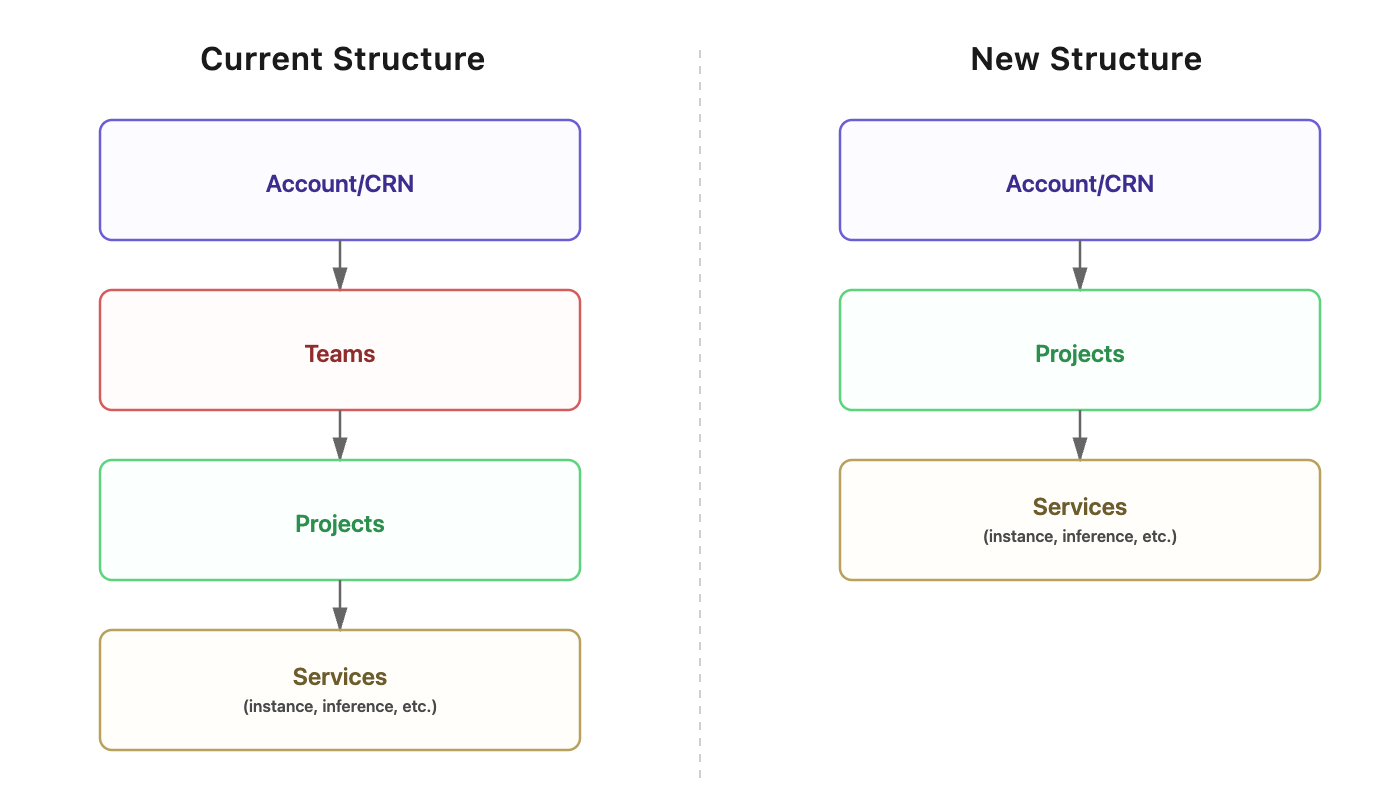
We are rolling out an update to simplify Identity and Access Management (IAM) and APIs within the TIR AI Platform. This change removes the Team layer that currently sits between Account/CRN and Projects, enabling access control to be managed directly at the Project level.
This update is intended to:
- Simplify the access control model
- Enable more direct and intuitive project-level access management
- Improve visibility and governance across the platform
- Simplify API structure by removing team-scoped paths
What's Changing
This release introduces updates across three key areas:
- Team Layer — The Team layer is removed, and projects move directly under the account with updated naming.
- Identity and Access Management (IAM) — Team-level roles are deprecated and transitioned to project-level roles.
- APIs — Team-scoped API paths are replaced with service-centric endpoints, with
project_idpassed as a query parameter.
1. Team Layer
This section outlines the structural and navigational changes users will experience in the platform following the removal of the Team layer.
Removal of the Team Layer
The Team entity is being deprecated and removed from the platform.
- All projects previously grouped under a team will now exist directly under your account/CRN.
- The Teams section will no longer be available in the account.
- Project access and membership will continue to be managed at the project level, as before.
Changes to Private Projects
Projects that were associated with Private Workspace will be converted into standard projects.
After the migration:
- Users can be added or removed from these projects through normal project settings.
- All existing Admins will automatically be granted access to these projects. This is consistent with Admin permissions, which are equivalent to Owner-level access.
Project Renaming
To preserve the contextual information that team names previously provided, all projects will be automatically renamed using the following format:
Format: <Team Name>-<Project Name>
Example: Team Alpha-Billing Service
After the release, you can optionally rename projects through Project Settings to better suit your preferences.
Consider an account with CRN 123 that has the following structure before the release:
Before:
CRN: 123 (Owner)
├── Private Workspace
│   └── project-private
└── TeamA
    └── project-A
After the release, the Team layer is removed. Both teams are dissolved, and all projects surface directly under the account — renamed to carry forward the team context:
After:
CRN: 123 (Owner)
├── Private Workspace-project-private
└── TeamA-project-A
Projects from Private Workspace are also converted into standard projects and become visible directly under the account.
2. Identity and Access Management (IAM)
This section covers all the changes related to roles, permissions, and access management as part of this update.
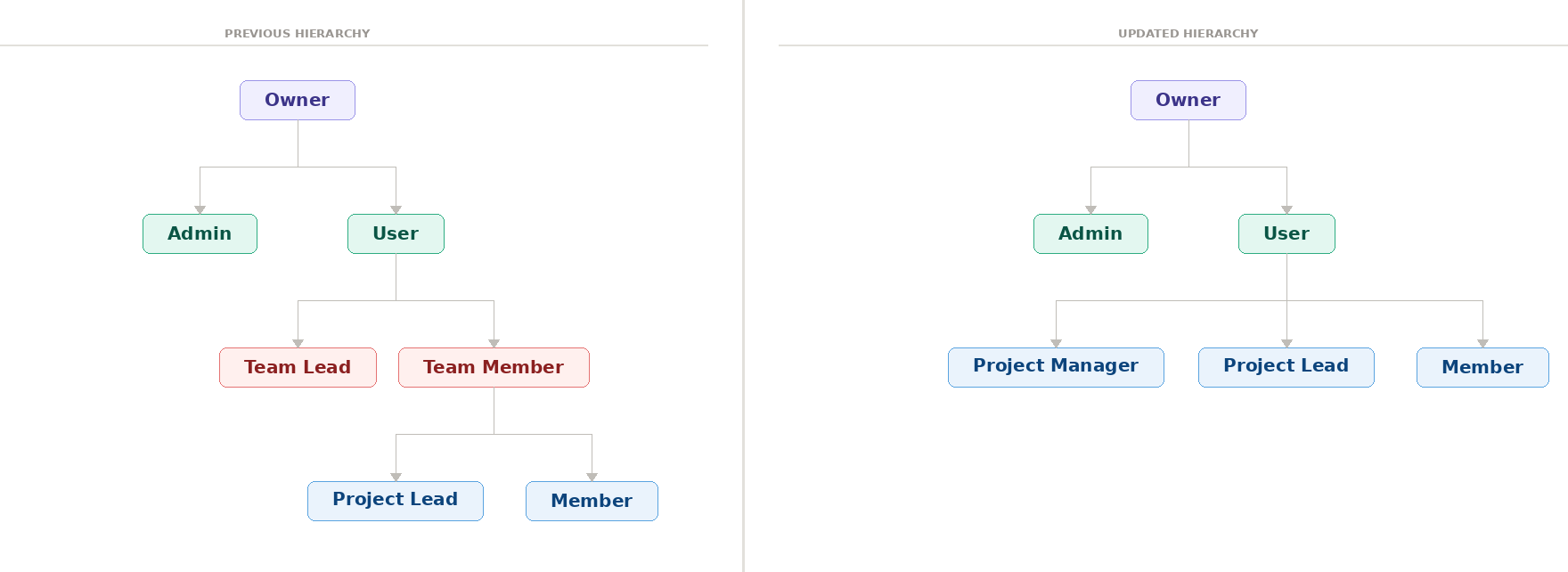
Roles Being Deprecated
The following team-level roles will be retired as part of this release:
- Team Lead
- Team Member
Role Migration
Existing role assignments will be automatically transitioned to maintain continuity of access:
- Team Lead → Project Manager: Every user currently assigned the Team Lead role will be automatically transitioned to the Project Manager role. This change will be applied across all projects previously associated with their team. As a result, if a Team Lead managed a team with multiple projects, they will have Project Manager access to each of those projects individually after the release. No action is required.
- Team Member: This role is removed. Users previously assigned as Team Member retain their existing project-level roles unchanged:
- Users with Project Lead access remain Project Lead on their assigned projects.
- Users with Member access remain Member on their assigned projects.
The Project Manager is the primary project-level administrative role in the updated hierarchy. This role replaces the Team Lead and carries full operational authority over assigned projects.
Permissions:
- Full administrative control over their assigned projects
- Authorized to create new projects within the account
- Add and manage project members at the Project Lead or Member level
- Assign and update access policies for project members
Restrictions:
- Cannot add or update users at the Project Manager level or above
Access Behavior Example
Consider User A (CRN-1) who owns an account with the following structure:
- Private Workspace containing
project-private - Team-A containing
Project-A - Team-B containing
Project-B
User A grants User B (CRN-2) access in the following scenarios.
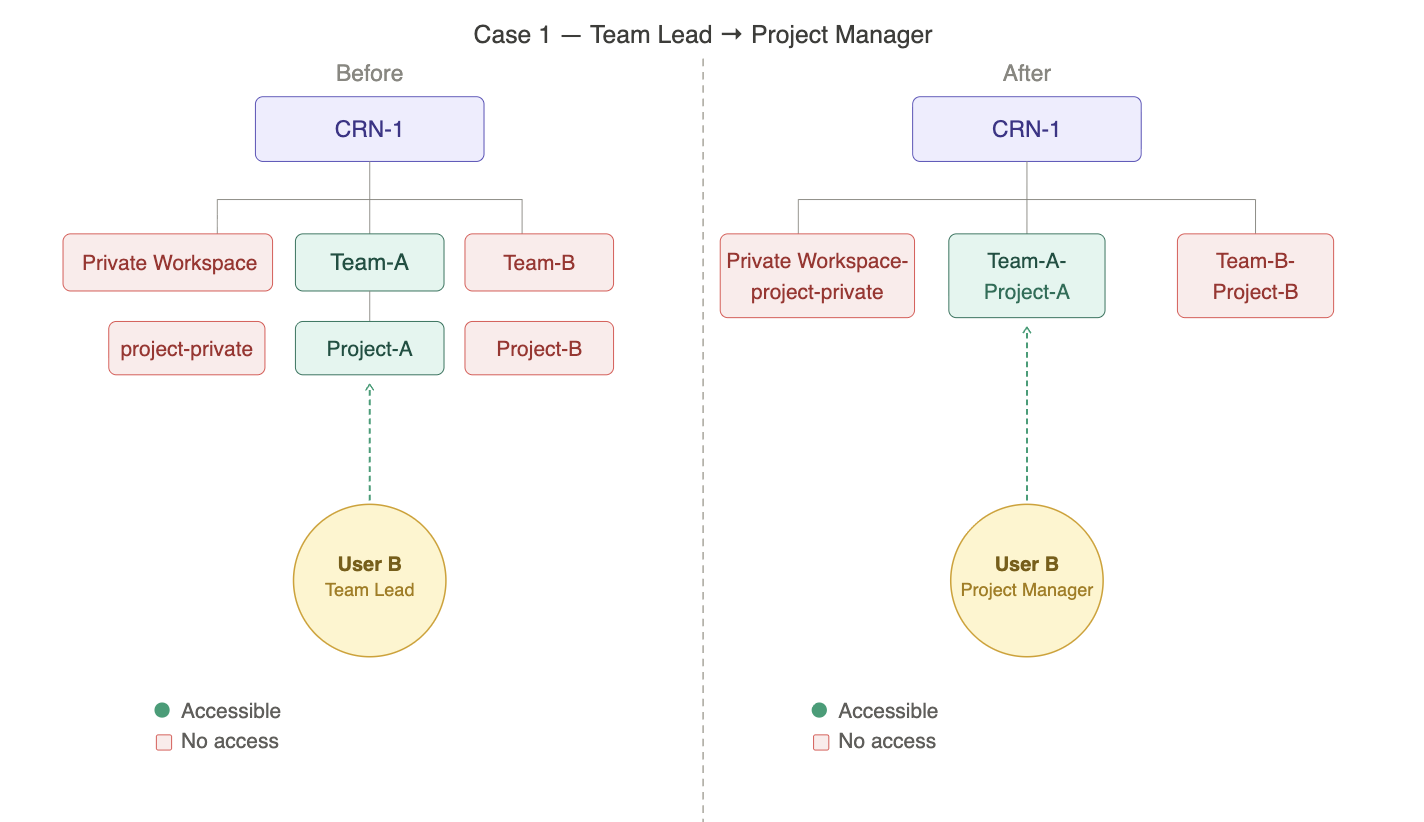
Case 1 — Team Lead → Project Manager
Current: User A adds User B as a Team Lead of Team-A. User B gains full administrative access to all projects under Team-A — they can manage project settings, add or remove members, and create new projects within the team. User B has no access to Team-B or Project-B, as the Team Lead role is scoped only to the assigned team.
After the Release: User B is automatically migrated to the Project Manager role and retains the same level of control over Team-A-Project-A, now managed directly without the team layer. User B continues to have no access to Team-B-Project-B — scope is preserved as-is.
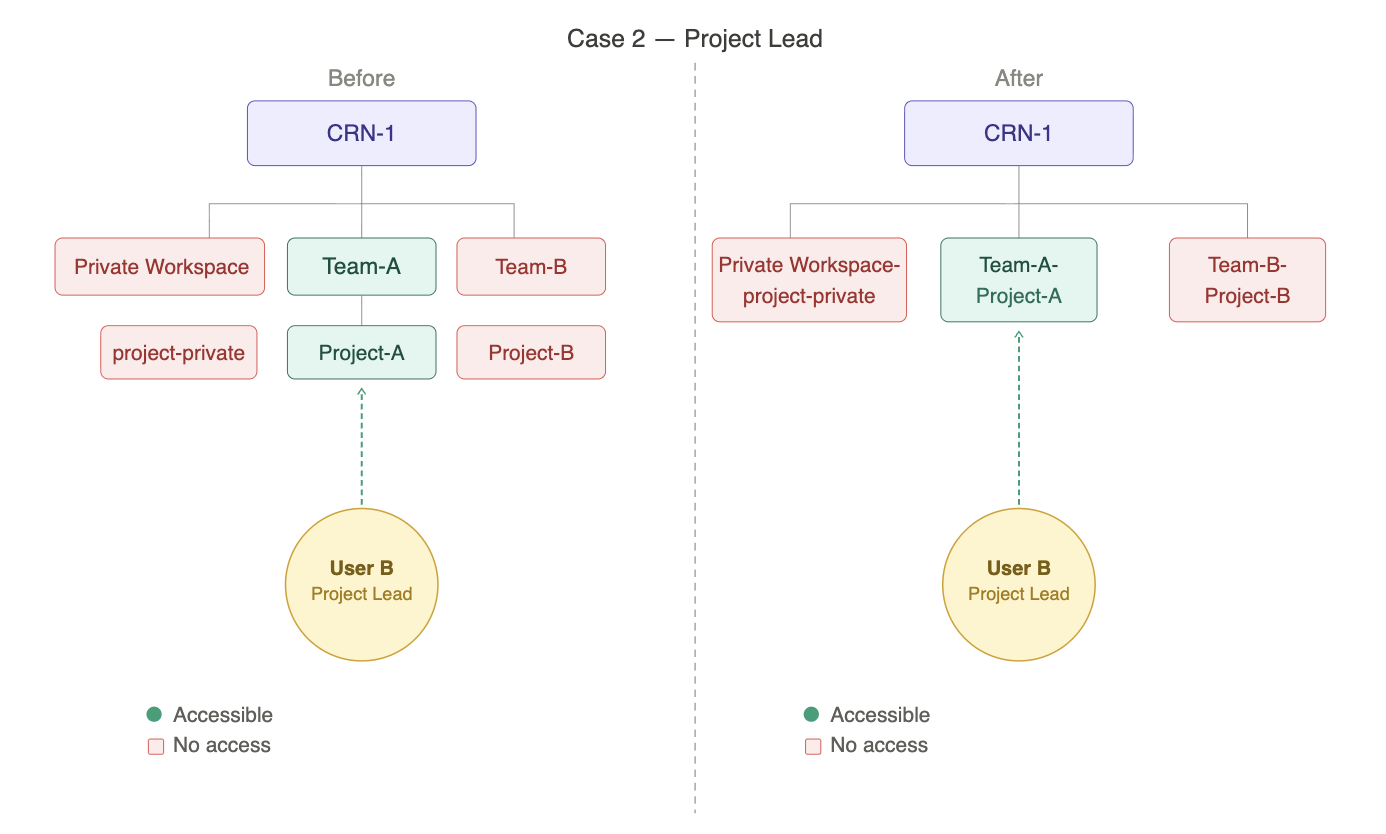
Case 2 — Team Member with Project Lead access
Current: User A adds User B as a Team Member of Team-A and assigns them the Project Lead role on Project-A. User B gets full operational access to Project-A and can manage its settings and resources, but cannot create or delete projects. User B has no access to Project-B under Team-B.
After the Release: The Team Member wrapper is removed. User B's Project Lead role is carried forward unchanged on Team-A-Project-A. Capabilities remain exactly the same. User B continues to have no access to Team-B-Project-B.
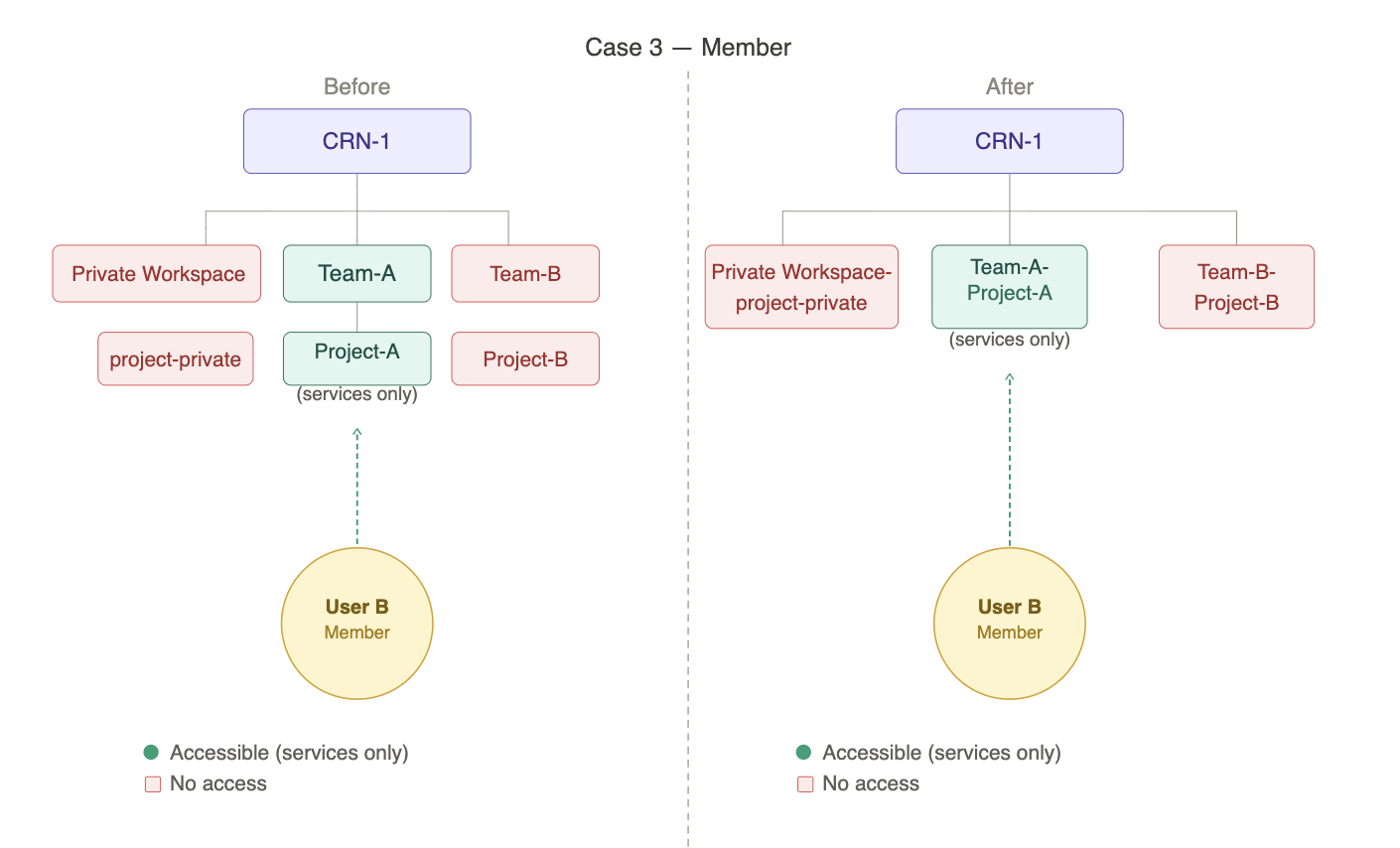
Case 3 — Team Member with Member access
Current: User A adds User B as a Team Member of Team-A and assigns them the Member role on Project-A. User B can access and use services within Project-A but has no administrative or management privileges. User B has no access to Project-B under Team-B.
After the Release: The Team Member wrapper is removed. User B's Member role is carried forward unchanged on Team-A-Project-A. Access level remains the same. User B continues to have no access to Team-B-Project-B.
Case 4 — Admin
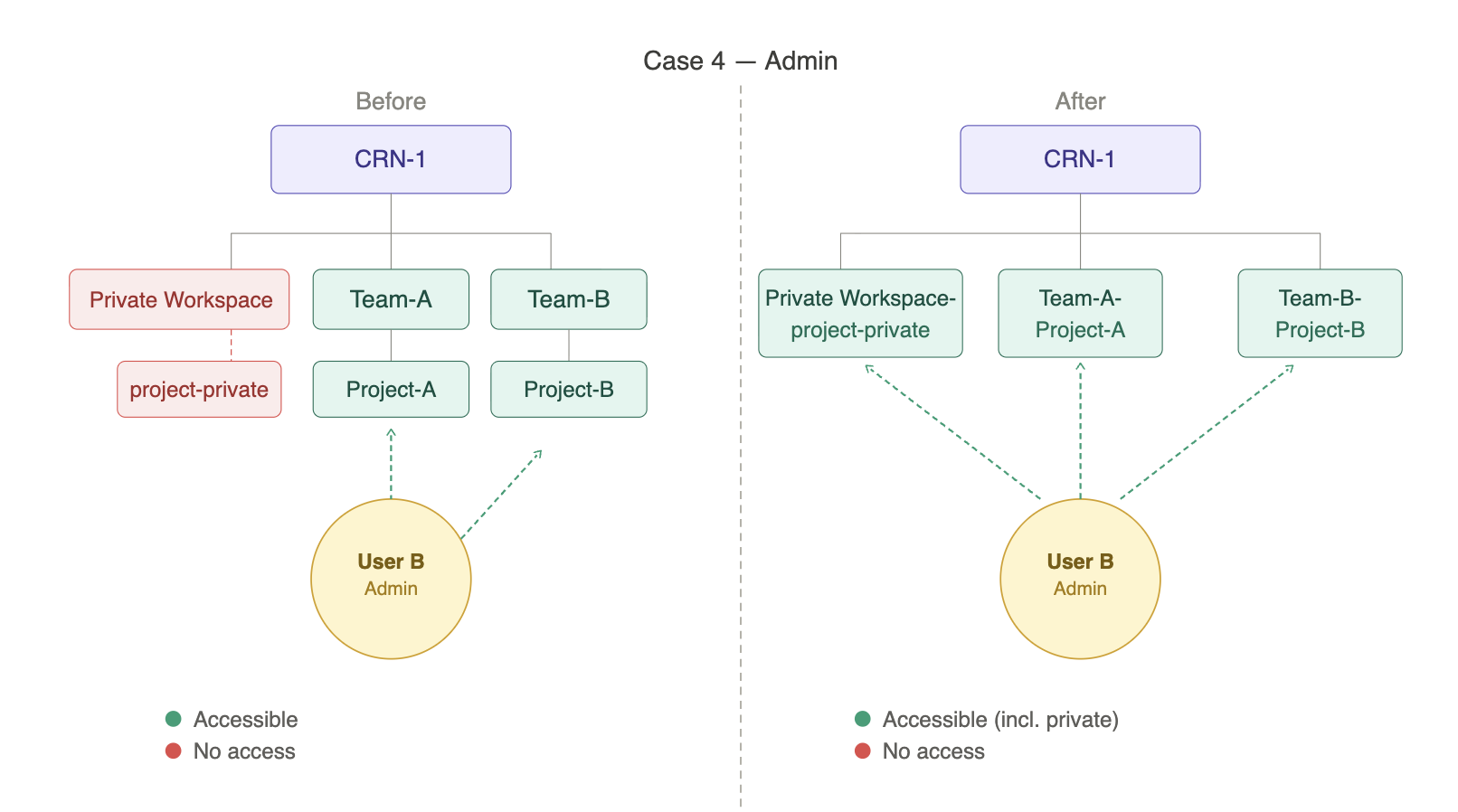
Current: User A assigns User B the Admin role. User B gains access to all teams and their associated projects — including both Team-A (Project-A) and Team-B (Project-B). However, the private workspace and its projects remain inaccessible — Admin access does not extend to private teams.
After the Release: The Admin role is updated to provide access to all projects under the account, including Team-A-Project-A, Team-B-Project-B, and projects that were previously part of the private workspace. With private team boundaries removed, Admin visibility is now aligned with Owner-level access across all projects.
Roles at a Glance
| Capability | Admin | Project Manager | Project Lead | Member |
|---|---|---|---|---|
| Access all projects | ✓ | — | — | — |
| Create/Delete projects | ✓ | ✓ | — | — |
| Manage project settings | ✓ | ✓ | ✓ | — |
| Invite users | ✓ * | ✓ ** | ✓ *** | — |
| Edit or remove existing users | ✓ * | ✓ ** | ✓ *** | — |
| Create and manage policies | ✓ | ✓ | ✓ | — |
| Use project services | ✓ | ✓ | ✓ | ✓ |
* Applies to Project Manager, Project Lead, or Member
** Applies to Project Lead or Member
*** Member only
No change in access permissions will occur as part of this transition. All users retain the same effective level of access they had before — only role names are updated where applicable.
3. APIs
As part of the IAM hierarchy simplification, a new version of the TIR APIs will be available following the release. All endpoints that previously included a /teams/{team_id} segment will now follow a service-centric structure, with project_id passed as a query parameter instead of a path segment. The previous API version will be deprecated after a transition period following the release and will no longer be supported. You will be notified via email prior to the deprecation of the previous API version.
Previous API Format
Existing API endpoints follow a team-scoped path that includes both a team identifier and a project identifier:
https://api.e2enetworks.com/myaccount/api/v1/gpu/teams/{team_id}/projects/{project_id}/{service_name}/
Updated API Format
With the team layer removed, endpoints are now led by the service name, with project_id passed as a query parameter:
https://api.e2enetworks.com/myaccount/api/v1/gpu/{service_name}/?project_id={project_id}
Key Changes
- The
/teams/{team_id}/projects/{project_id}path segment is removed from all API endpoints. project_idis now passed as a query parameter rather than a path segment.
A new version of the API will be available after the release. Updated API reference documentation will be published at the same time. Existing integrations using team-scoped endpoints must be migrated to the new project-centric format after the release. The previous API version will be deprecated after a transition period following the release and will no longer be supported. You will be notified via email prior to the deprecation of the previous API version.
Impact Summary
| Area | Impact |
|---|---|
| Hierarchy | The Team layer is removed; projects are managed directly under Account/CRN |
| Roles | Team Lead and Team Member roles deprecated |
| Permissions | No change to effective access levels or permissions |
| Private Projects | Projects associated with private workspace are converted to standard projects |
| Admin Access | Admins automatically granted access to all previously private projects |
| Project Naming | Project names are updated to the <Team Name>-<Project Name> format |
| APIs | Team-scoped endpoints (/teams/{team_id}/projects/{project_id}/{service_name}/) are replaced with project-centric paths (/{service_name}/?project_id={project_id}) |
Customer Action Required
IAM & Team Changes — No Action Required
All IAM migrations are handled automatically. Role transitions, project restructuring, and access assignments will be applied without any manual intervention.
After the release, you may optionally:
- Review and update project names
- Validate project membership and access assignments
- Adjust project-level access controls as needed
API Changes — Action Required
If your integration uses team-scoped API endpoints, you must migrate to the new service-centric format after the release. The previous API version will be deprecated after a transition period following the release and will no longer be supported.
Update all endpoints from:
https://api.e2enetworks.com/myaccount/api/v1/gpu/teams/{team_id}/projects/{project_id}/{service_name}/
To:
https://api.e2enetworks.com/myaccount/api/v1/gpu/{service_name}/?project_id={project_id}
Updated API reference documentation will be published alongside the release.
Key Benefits
- Simplified access control — Fewer hierarchy layers result in a more intuitive management experience.
- Reduced structural dependency — Access can be managed directly at the project level without navigating team structures.
- Improved visibility — Clearer, flatter oversight of who has access to what across all projects.
- Easier onboarding — New users can be added directly to projects without requiring team assignment.
These changes will take effect on May 7, 2026 and will be applied automatically to all accounts. A downtime is scheduled from 6:30 PM to 6:45 PM. There will be no impact on your existing workload, and they will continue to run as usual. No action is required prior to the release.