Quick Start Guide
Prerequisites
- TIR Account: Ensure you have access to a TIR project.
- (Optional) MinIO CLI (
mc): Useful for advanced management from your local machine. Install Guide
Create a New Dataset
-
Log in to TIR: Navigate to your project dashboard.
-
Navigate to Datasets:
-
Click on Storage > Datasets in the sidebar.
-
Click LAUNCH DATASET.
-
-
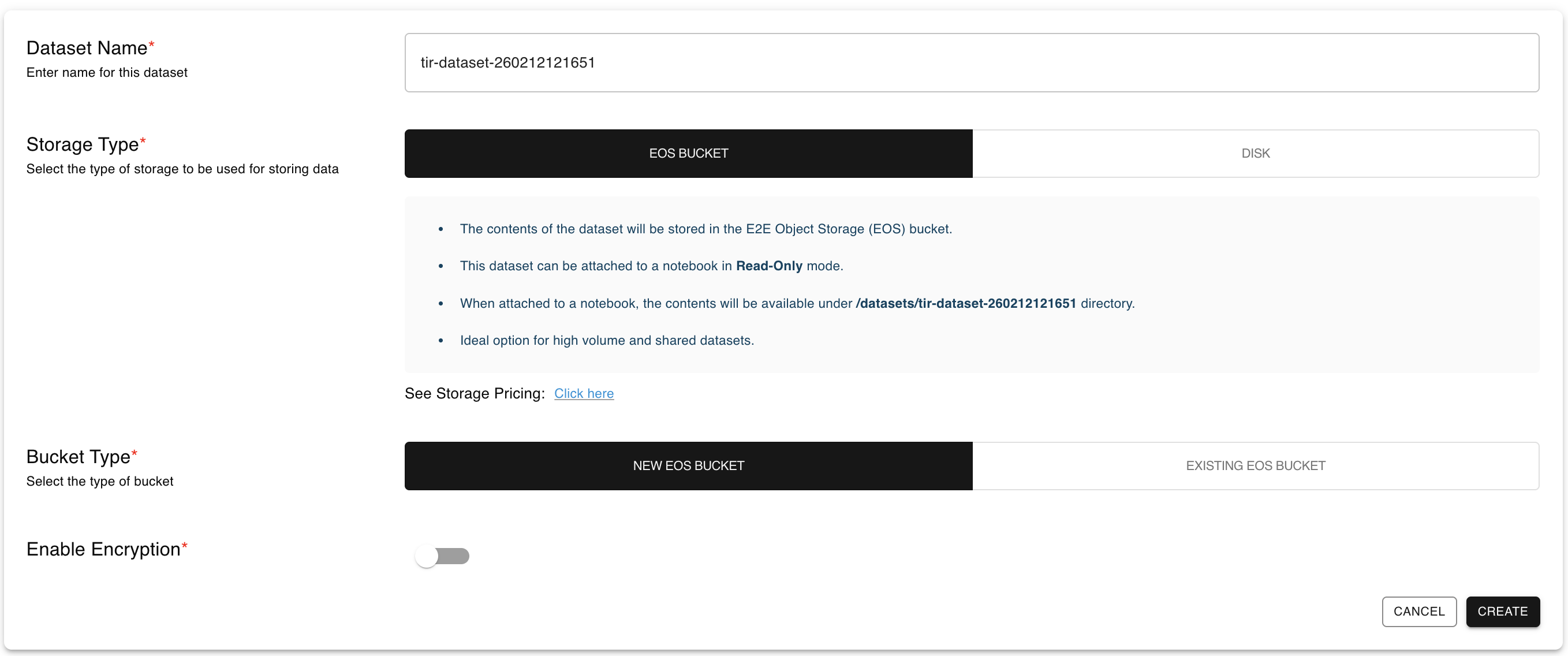
Choose Storage Type: Select either EOS Bucket or Disk.
-
Configure & Create:
- Enter a unique Dataset Name.
- (For EOS) Choose Encryption Type (Managed or User-Managed).
- Click CREATE.
Note: For more details about encryption options, see the Features page.
API Reference
For programmatic access to Datasets, refer to our comprehensive API documentation:
Learn how to create, manage, and interact with Datasets using the TIR API. Includes endpoints for listing datasets, creating new datasets, and managing dataset configurations.
Last updated on June 1, 2026.